How to Choose a Random Winner from a Facebook or Instagram Comment Contest
Picking a winner from a comment contest sounds simple until you have 35,000 entries and no system. This guide walks you through exactly how to collect comments, check eligibility, randomize fairly, and announce a winner your audience will trust — with a real example from a brand that pulled it off at scale.
:format(webp))
You ran the contest. People showed up. Now your post has hundreds of comments and you need to pick a winner without it turning into a nightmare.
This is the part most guides skip over. They'll walk you through how to set up a giveaway, what to post, how to write the caption — and then leave you on your own when it comes to actually selecting a winner. Which is a problem, because choosing a winner badly can undo all the goodwill your contest just built.
Here's how to do it right.
Why You Can't Just "Pick Someone" Manually
It's tempting to scroll through the comments, close your eyes, and point. But manual selection creates real problems.
First, it's not actually random. Humans are bad at random. We gravitate toward names we recognize, comments that made us laugh, or entries near the top of the thread. That's bias, even if it's unintentional.
Second, it's not verifiable. If a follower questions your pick, you have no way to prove the selection was fair. And people do question it, especially when a prize is involved.
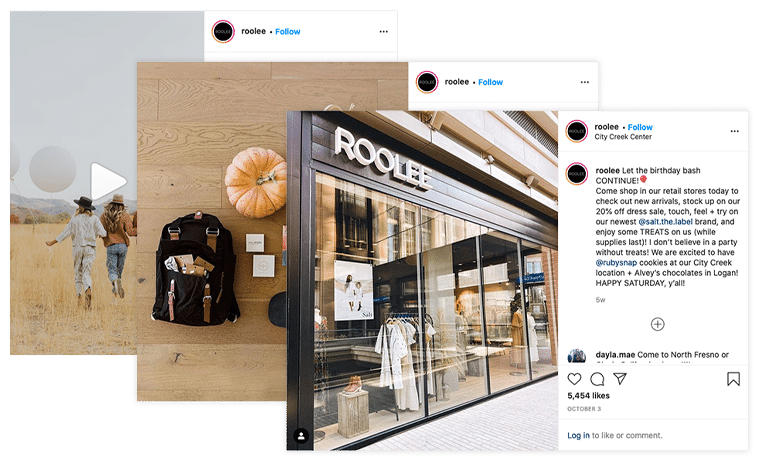
Third, it doesn't scale. A post with 50 comments is manageable. A post with 800 comments is not. And if your contest does well? You could be looking at tens of thousands of entries. ROOLEE, a women's clothing and home goods brand based in Logan, Utah, ran a comment-to-enter contest on Instagram to celebrate their seventh anniversary — and collected 35,016 comments over a nine-day entry period. Scrolling through those by hand wasn't an option.
 A legitimate random selection process protects you, protects your brand, and makes your winners feel like they actually won something fair.
Step 1: Decide Who's Eligible Before You Pull Any Names
Before you touch the comments, go back to your original post and look at your entry rules. Common requirements include:
- Following your account
- Leaving a specific type of comment (a word, a tag, an answer to a question)
- Tagging one or more friends
- Completing multiple actions (follow + comment + share)
You need to filter your entries against these rules before randomizing. Picking a winner who didn't actually follow you, or who tagged zero friends when the rules said to tag two, creates a mess you'll have to clean up publicly.
ROOLEE's entry requirements were clear from the start: follow the @roolee account, like the post, and tag someone you love in the comments. Having simple, well-defined rules made the eligibility check straightforward, even with 35,000 entries in play.
Make a list of your eligibility criteria and keep it in front of you for the next steps.
Step 2: Collect All the Comments
This is where things get tedious if you're doing it by hand. For smaller contests with under 100 comments, you might be able to copy entries into a spreadsheet manually. But for anything larger, you need a tool.
If you used an online tool like ShortStack to run your contest, this part is already handled. ShortStack's comment importer pulls in every comment from your Facebook or Instagram post automatically. You get a clean list of verified entries without the manual work. That's exactly what ROOLEE did — at the end of their entry period, they imported all comments directly into ShortStack, turning 35,000-plus entries into a manageable, organized list.
If you ran the contest natively on social, you have a few options:
- Export comments using a third-party social media management tool
- Copy and paste comments into a spreadsheet (painful, but doable for small contests)
- Use a comment-collection tool before moving to a randomizer
Whatever method you use, your goal at the end of this step is a single, complete list of eligible entries.
Step 3: Remove Ineligible Entries
Now go through your list and remove anyone who didn't meet the requirements. This includes:
- Accounts that don't follow you (if that was a requirement)
- Comments that didn't include the required tag, word, or answer
- Duplicate entries from the same account, if your rules only allowed one entry per person
- Spam or clearly bot-generated comments
- Your own team members, if you excluded employees from winning
If someone entered multiple times and your rules allowed it, keep all their entries. Multiple entries equal multiple chances to win, and that's a feature, not a bug. Just make sure your rules were clear about it upfront.
Step 4: Randomize and Pick a Winner
With a clean list of eligible entries, you're ready to select.
Option A: Use ShortStack's built-in winner picker. If you ran your contest through ShortStack, you can select a winner directly inside the platform. It pulls from your verified entry list, randomizes automatically, and logs the selection so you have a record of it. This is the cleanest option because everything lives in one place. After importing their comments, ROOLEE used ShortStack's entry selector to choose a random winner and then tagged the winner directly in the original contest post.
Option B: Use a spreadsheet randomizer. If your entries are in Google Sheets or Excel, you can use a formula to select a random entry. In Google Sheets, the formula =INDEX(A2:A500, RANDBETWEEN(1, COUNTA(A2:A500))) will pick a random name from your list. Run it a few times and screenshot the result before it recalculates.
Option C: Use a third-party random picker. ShortStack also offers a free tool that lets you paste in a list of names and select a winner. It’s totally free and generates a shareable result you can screenshot. Check out their winner picker here.
Whatever method you use, document it. Take a screenshot of the winning entry, the tool you used, and the timestamp. You'll want that record if anyone asks.
Step 5: Verify the Winner Before You Announce
Before you post anything, check a few things:
- Does the winner actually follow your account right now? (People sometimes follow to enter, then unfollow before the winner is announced.)
- Did they complete all the entry requirements as of the contest close date?
- Is this a real account with normal activity, not a bot or a spam profile?
If the winner doesn't check out, go back to your randomizer and pull an alternate. It's smart to select two or three backups at the same time so you're not starting over if the first winner doesn't respond or isn't eligible.
Step 6: Announce the Winner Publicly
Post the winner in the comments of the original contest post and, if possible, in a follow-up feed post. Tagging the winner directly is the most effective way to make sure they see it.
Your announcement should include:
- A clear congratulations to the winner (tagged by name)
- The prize they won
- How they can claim it (DM you, click a link, email you, etc.)
- A deadline for claiming, typically 24 to 72 hours
The public announcement does two things. It validates the contest for everyone who entered and builds trust for future giveaways. People are more likely to enter your next contest if they see that real winners are announced and prizes actually go out.
Step 7: Follow Up and Close the Loop
Once the winner responds and claims the prize, you're done. But there are a few things that will make your next contest run better:
- Note how many total entries you received
- Note how many were ineligible and why
- Save your winner selection screenshot and eligibility documentation
- Track follower growth and engagement lift from the contest period
ROOLEE's ninth-anniversary contest is a good model here. Beyond the 35,016 comments, their post received 14,489 likes and their Instagram following grew by 2,200 new followers over the nine-day entry period. They credited part of that success to promoting the contest before it launched — publishing a full schedule of events for the weekend so followers knew exactly where to find the deals and what to expect. That pre-contest visibility translated directly into higher engagement once the post went live.
That kind of data is genuinely useful. It helps you write better rules next time, set more realistic expectations for how many people will enter, and prove the ROI of running contests in the first place.
The Easiest Way to Handle All of This
If you run contests regularly, doing all of this manually every time gets old fast. ShortStack is built specifically for brands and marketers who run comment contests, giveaways, and sweepstakes on social media. It collects entries automatically, verifies them against your rules, handles duplicate detection, and picks winners from a verified entry pool.
ROOLEE used ShortStack to manage their 35,000-comment contest from import to winner selection, without the chaos that would have come from trying to handle it manually. You can try ShortStack free at ShortStack.com and run your first contest without needing a developer or a complicated setup. You can even import your first 200 comments totally for free. For teams running multiple campaigns a month, it's the difference between a contest that takes hours to wrap up and one that's done in ten minutes.
Frequently Asked Questions
Can I pick a winner from Instagram comments manually? You can, but it's not recommended. Manual selection isn't random, can't be verified, and gets unmanageable at any real scale. A tool or formula-based method is more defensible and less time-consuming.
What if the winner doesn't respond? Set a clear claim deadline in your announcement (24 to 72 hours is standard). If they don't respond in time, move to your backup winner. Make sure your original contest rules mentioned that unclaimed prizes would go to an alternate.
Do I need to follow my own rules? Yes, and publicly. Your contest rules are a promise to everyone who entered. If you change the requirements after the fact, you'll lose trust fast and open yourself up to complaints.
How do I handle duplicate entries? Decide before the contest whether duplicates are allowed. If they're not, remove them during the eligibility check. If you allow multiple entries (through tagging different friends, for example), keep each valid entry separately.
Is it legal to run a comment contest on Facebook or Instagram? Both platforms allow comment-based contests, but each has its own promotion guidelines. Facebook requires that you acknowledge the promotion is not sponsored by Facebook. Instagram has similar requirements. Neither platform allows you to require sharing to a personal timeline as a condition of entry. Always check current platform guidelines before you launch.
Running a comment contest is one of the fastest ways to grow engagement and collect leads on social media. The winner selection process doesn't have to be the hard part. Get your entry list clean, pick randomly, document everything, and announce publicly. That's it.
![User-generated Content and Content Rights Management [Free Guide]](https://cdn.shortstack.com/website/blog/user-generated-content-and-rights-management/68b0e4d1334e3be03938bff3_6537aa08ba7f35fbace74b39_ugc-rights-guide-share.jpeg)