Simple: autofilling form fields using query string parameters
In certain situations, you may want to streamline the user experience by pre-filling form fields with information already collected elsewhere. By appending query string parameters to your campaign URL, you can automatically populate specific fields in your ShortStack form. This guide walks you through the simple setup.
Setting up your form container and Field Widgets
- In the Campaign Builder, add a Form Container to your campaign.
- Add Field Widgets corresponding to the data you wish to collect (e.g., Name, Email, Country).
- Once your form is set up, publish the campaign to generate the Campaign URL.
Constructing your campaign URL with parameters
To pre-fill form fields, you'll need to append query string parameters to your Campaign URL. The format is as follows:
https:<span class="hljs-comment">//yourcampaignurl.com?parameter1=value1¶meter2=value2</span>
Steps
- Determine the field names in your ShortStack form that you wish to pre-fill. It's advisable to use these exact names as parameters to avoid confusion.
- Append each field name and its corresponding value as a query string parameter to your Campaign URL.
Example
https://yourcampaignurl.com?email=example@example.com&country=USA
Handling multi-section fields
For fields with multiple sections (e.g., First Name and Last Name), separate the values using a pipe character (|).
Example
https:<span class="hljs-comment">//yourcampaignurl.com?name=John|Doe</span>
This will populate "John" in the First Name field and "Doe" in the Last Name field.
Custom fields
For any custom fields (Text, Boolean, List, Date, Number), you will need to use the Internal Field Map ID. This is found at the bottom left corner of the Field Widget settings.
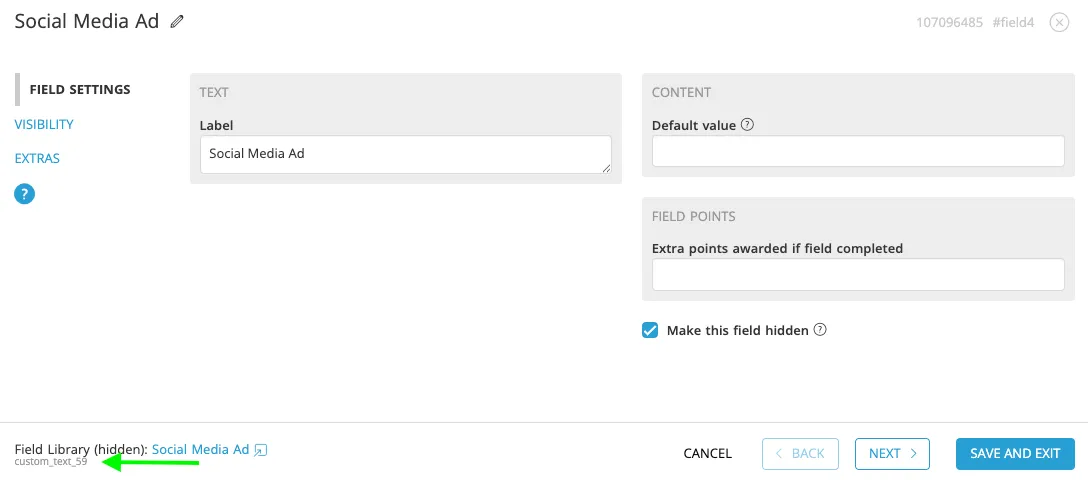
For the Text Field above, the Internal Field Map ID is custom_text_59.
Example
https:<span class="hljs-comment">//yourcampaignurl.com?custom_text_59=instagram</span>
Note: If you want to use your own text in the URL, you should use the Advanced Setup Method. Advanced: Autofilling Form Fields Using Query String Parameters
Finish creating your campaign
Once you are finished configuring your parameters, you are done! ShortStack will automatically import data from the URL into the Fields widget, with no Action Widget(s) required.
Related resources
9 Ways to Leverage the Data You Collect From Your Fans (Blog Post)
Advanced: Autofilling Form Fields Using Query String Parameters (Help Doc)
Was this helpful?
Thanks — that helps us decide what to fix next.
Sorry this missed. Tell us what you needed and we'll get you an answer — and fix the page.